
How to Open Demat and Trading Account Free in Zerodha Broker - Complete Guide 2025
What is a Demat and Trading Account?
Before we learn how to open an account, let us understand what these accounts are.
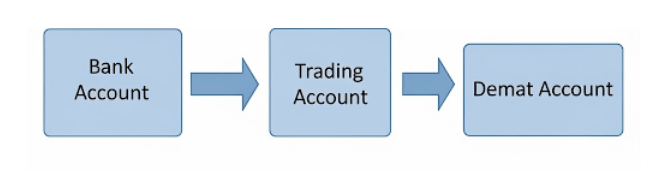
A Demat account is like a digital locker. It keeps your shares safe in electronic form. Just like you keep money in a bank account, you keep shares in a Demat account.
A Trading account helps you buy and sell shares. Think of it as a bridge between your bank account and Demat account
Why Choose Zerodha Broker?
Zerodha is India’s largest stock broker. Here’s why people love Zerodha:
- Free account opening - No charges to open account
- Low brokerage - Only ₹20 per trade
- Easy to use app - Simple mobile app called Kite
- Good customer support - Help available when needed
- Educational content - Free learning materials
Documents You Need to Open Zerodha Account
Before starting, collect these important documents
- Adhar Card (Must have)
- Bank statement or Cancelled cheque (Any one)
- Income proof (Salary slip, ITR, or bank statement)
- Photo (Pass port size)
- Signature (On white paper)
For Students (Below 18 years)
- Student's Adhar Card (Must have)
- Parent's Adhar Card (Must have)
- Parent's Pan Card (Must have)
- Bank Account (Joint with Parents)
- Photo (Pass port size)
- Signature (On white paper)
Step-by-Step Guide to Open Zerodha Account
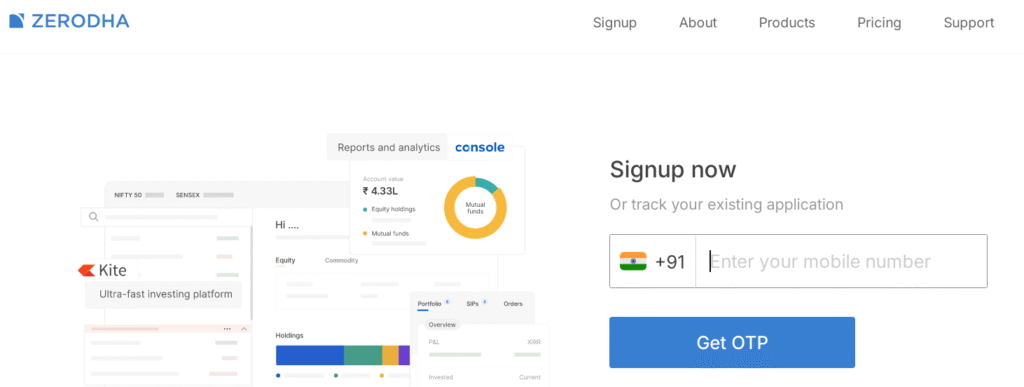
Step 1: Visit Zerodha Website
- Open your computer or phone or click on link here
- Click on “Open an Account” button
- You will see a big green button – click on it
Step 2: Fill Basic Information
- Enter your mobile number
- Enter your email address
- Click “Continue”
- You will get an OTP on your phone
- Enter the OTP number
- Click “Verify”
Step 3: Choose Account Type
You will see different account options:
- Equity – For buying shares (Choose this)
- Commodity – For trading in gold, silver (Optional)
- Currency – For currency trading (Optional)
For beginners, choose only Equity account.
Step 4: Fill Personal Details
Fill this information carefully:
- Full name (As written in PAN card)
- Date of birth
- Gender
- Father’s name
- Mother’s name
- PAN number
- Aadhaar number
Important: Write exactly as shown in your documents
Step 5: Add Address Information
- Current address (Where you live now)
- Pin code
- City and State (Will fill automatically)
- Permanent address (Tick same as current if both are same)
Step 6: Income and Bank Details
- Annual income – Choose from dropdown
- Occupation – Student/Service/Business
- Bank account number
- IFSC code (Found on your cheque book)
Bank name and branch
Step 7: Upload Documents
Now upload clear photos of your documents:
- PAN Card – Front side only
- Aadhaar Card – Front and back side
- Bank proof – Cancelled cheque or bank statement
- Income proof – Salary slip or ITR
- Your photo – Passport size, clear face
- Signature – On white paper, black pen
Tips for good photos:
- Use good lighting
- Keep documents flat
- All text should be clearly readable
- File size should be less than 5MB
Step 8: Complete Video Call
Zerodha will schedule a video call for verification:
- You will get SMS with date and time
- Keep all original documents ready
- The call will take 5-10 minutes
- Show your face and documents clearly
- Answer simple questions about yourself
Step 9: E-Sign Your Application
- After video call, you will get e-sign link
- Click on the link
- Enter your Aadhaar OTP
- Your application will be signed digitally
- This completes your application process
Step 10: Account Activation
- Zerodha will verify your documents
- This takes 2-4 working days
- You will get email when account is ready
- Login details will be sent to your email
- Download Kite app from Play Store
How to Start Trading After Account Opening
Download and Setup Kite App
- Download Kite app from Google Play Store or App Store
- Login with your User ID and Password
- Set MPIN for security
- Add money to your account
- Start trading
Important Things to Remember
Account Charges:
- Account opening – FREE
- Annual maintenance – ₹300 per year
- Trading charges – ₹20 per trade
- Demat charges – ₹13 per month (if you hold shares)
- amounts
Safety Tips:
- Never share your login details
- Always logout after trading
- Keep MPIN secret
- Check your account regularly
- Start with small amounts
Common Problems and Solutions
Document Rejection:
- Make sure all documents are clear
- Check that names match exactly
- Upload correct file format (JPG, PDF)
Video Call Issues:
- Use good internet connection
- Keep documents ready before call
- Speak clearly during verification
Login Problems:
- Check your User ID and Password
- Reset password if forgotten
- Contact customer care if needed
Conclusion
Opening a Demat and Trading account with Zerodha is easy and free. Just follow these simple steps:
- Collect all required documents
- Fill the online form carefully
- Upload clear document photos
- Complete video verification
- Wait for account activation
Remember to start with small investments and learn about the share market before trading big amounts. Yogeshalimacademy provides free Basic course to help you become a smart investor.
Want to learn step-by-step from experts?
Check out our Share Market Courses here
Read Our Popular articlas:
- Beginners-roadmap-how-to-learn-share-market-trading-in-30-days.
- Complete Guide to Initial Public Offer in Indian Share Market.
- Complete Guide to Price Bar Analysis for Stock Trading
- Top 10 Mistakes New Stock Traders Make and How to Avoid Them
- Beginner’s Guide to Share Market Trading in India
Ready to start your investment journey?
Visit Zerodha today and open your free account!
This guide is created by Yogesh Ali Academy – Your trusted partner in share market education. For more investment tips and training, visit our website.
Frequently Ask Questions
A: Yes, account opening is completely free. You only pay annual maintenance charges after one year.
A: Yes, students above 18 can open account. Below 18 need parent’s help.
A: Usually 2-4 working days after document submission.
A: You can upload corrected documents again without any extra charges.