
How to Open Demat and Trading Account Free in Zerodha Broker - Complete Guide 2025
What is a Demat and Trading Account?
Before we learn how to open an account, let us understand what these accounts are.
A Demat account is like a digital locker. It keeps your shares safe in electronic form. Just like you keep money in a bank account, you keep shares in a Demat account.
A Trading account helps you buy and sell shares. Think of it as a bridge between your bank account and Demat account
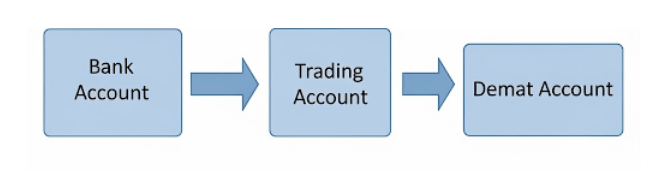
Why Choose Zerodha Broker?
Zerodha is India’s largest stock broker. Here’s why people love Zerodha:
- Free account opening - No charges to open account
- Low brokerage - Only ₹20 per trade
- Easy to use app - Simple mobile app called Kite
- Good customer support - Help available when needed
- Educational content - Free learning materials
Documents You Need to Open Zerodha Account
Before starting, collect these important documents
- Adhar Card (Must have)
- Bank statement or Cancelled cheque (Any one)
- Income proof (Salary slip, ITR, or bank statement)
- Photo (Pass port size)
- Signature (On white paper)
For Students (Below 18 years)
- Student's Adhar Card (Must have)
- Parent's Adhar Card (Must have)
- Parent's Pan Card (Must have)
- Bank Account (Joint with Parents)
- Photo (Pass port size)
- Signature (On white paper)
Step-by-Step Guide to Open Zerodha Account
Online Account Opening Process
Visit Zerodha Website for Sign Up
- Sign Up: Visit Zerodha’s website and click on “Sign Up Now”. Enter your mobile number and verify it with the OTP.
- Verify Email: Enter the OTP received on your email ID and verify it.
- Enter PAN and DOB: Fill in your PAN number and date of birth.
- Pay Account Opening Fees: Pay the account opening fees (which is ₹0) using UPI or net banking.
- Aadhaar Verification: Sign in to your Digilocker account to share your Aadhaar details with Zerodha.
- Bank Account Details: Enter your bank account details and background information.
- IPV Verification: Complete the In-Person Verification (IPV) process.
- Document Upload: Upload required documents like PAN, Aadhaar, and bank proof
Offline Account Opening Process
If you prefer offline account opening, you can download the application form, fill it, and courier it to Zerodha’s address along with the required documents ¹ ² ³.
Required Documents
- PAN card
- Aadhaar card (linked to your mobile number)
- Bank proof (cancelled cheque or bank statement)
- Income proof (if trading in F&O)
- Photo
That’s it! Your account will be opened within 72 hours, and you’ll receive your login credentials via email ¹.
How to Start Trading After Account Opening
Download and Setup Kite App
- Download Kite app from Google Play Store or App Store
- Login with your User ID and Password
- Set MPIN for security
- Add money to your account
- Start trading
Important Things to Remember
Account Charges:
- Account opening – FREE
- Annual maintenance – ₹300 per year
- Trading charges – ₹20 per trade
- Demat charges – ₹13 per month (if you hold shares)
- amounts
Safety Tips:
- Never share your login details
- Always logout after trading
- Keep MPIN secret
- Check your account regularly
- Start with small amounts
Common Problems and Solutions
Document Rejection:
- Make sure all documents are clear
- Check that names match exactly
- Upload correct file format (JPG, PDF)
Video Call Issues:
- Use good internet connection
- Keep documents ready before call
- Speak clearly during verification
Login Problems:
- Check your User ID and Password
- Reset password if forgotten
- Contact customer care if needed
Conclusion
Opening a Demat and Trading account with Zerodha is easy and free. Just follow these simple steps:
- Collect all required documents
- Fill the online form carefully
- Upload clear document photos
- Complete video verification
- Wait for account activation
Remember to start with small investments and learn about the share market before trading big amounts. Yogeshalimacademy provides free Basic course to help you become a smart investor.
Want to learn step-by-step from experts?
Check out our Share Market Courses here
Read Our Popular articlas:
- Beginners-roadmap-how-to-learn-share-market-trading-in-30-days.
- Complete Guide to Initial Public Offer in Indian Share Market.
- Complete Guide to Price Bar Analysis for Stock Trading
- Top 10 Mistakes New Stock Traders Make and How to Avoid Them
- Beginner’s Guide to Share Market Trading in India
Ready to start your investment journey?
Visit Zerodha today and open your free account!
This guide is created by Yogesh Ali Academy – Your trusted partner in share market education. For more investment tips and training, visit our website.
Frequently Ask Questions
A: Yes, account opening is completely free. You only pay annual maintenance charges after one year.
A: Yes, students above 18 can open account. Below 18 need parent’s help.
A: Usually 2-4 working days after document submission.
A: You can upload corrected documents again without any extra charges.